SmartDNS部署与分流
LAN Client
   |
   |  DNS 53 (DHCP网关IP)
   v
[ 网关 / SmartDNS ]
   |
   |-- CN 域名 → 223 / 119
   |-- 非 CN → 8.8.8.8
   |
[ 你的静态路由 / 默认路由 ]
下载安装
官方安装包
wget https://github.com/pymumu/smartdns/releases/download/Release47.1/smartdns.1.2025.11.09-1443.x86_64-linux-all.tar.gz
tar zxf smartdns.1.2025.11.09-1443.x86_64-linux-all.tar.gz
cd smartdns/
sudo chmod +x ./install

sudo bash ./install -i


#如果报错sudo: unable to resolve host armubuntu 主机名解析失败,直接修改hosts文件
sudo vi /etc/hosts
127.0.0.1    armubuntu  localhost
::1          armubuntu  localhost
(可选)修改系统占用53端口(不监听所有端口,只要求lan的网关53端口能正常走指定路由解析)
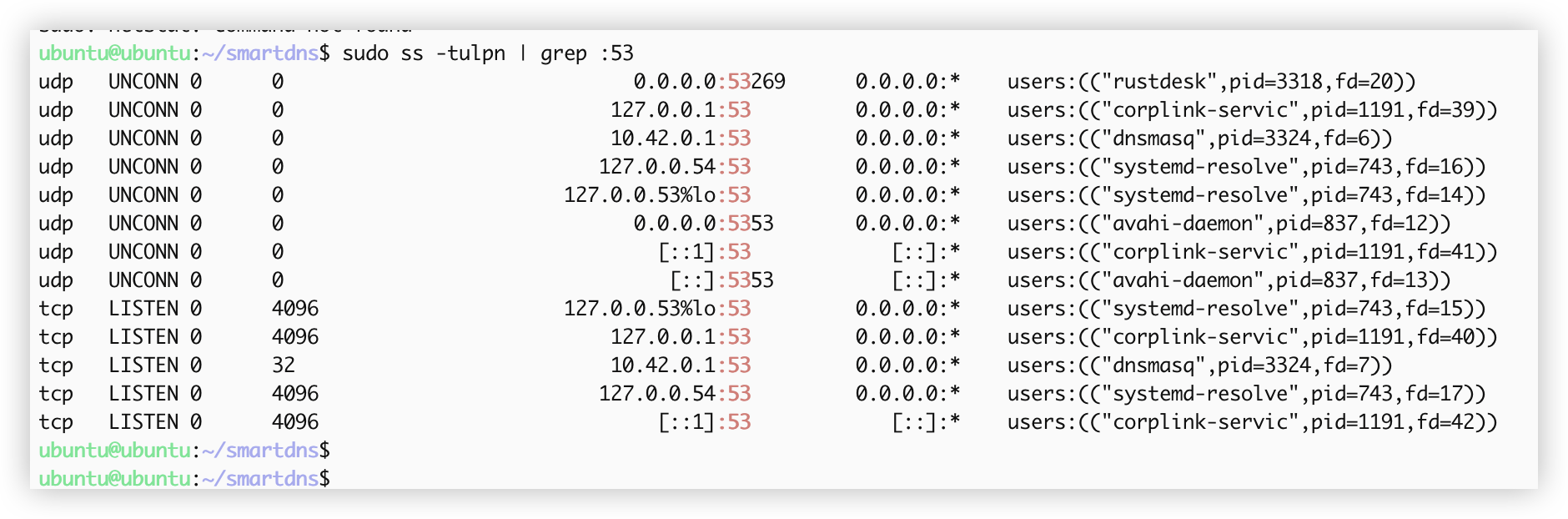
或者直接修改resolv.conf:
# 创建静态的resolv.conf
sudo rm /etc/resolv.conf
sudo tee /etc/resolv.conf << 'EOF'
nameserver 172.20.22.254
# 可选的备用DNS,如果需要的话
# nameserver 8.8.8.8
# nameserver 1.1.1.1
EOF

# 防止被覆盖
sudo chattr +i /etc/resolv.conf  # 加锁
# 解锁时用:sudo chattr -i /etc/resolv.conf
配置Smartdns
# 下载Ads list
# wget "https://anti-ad.net/anti-ad-for-smartdns.conf" -O /etc/smartdns/ads.conf
# 下载CN list
# wget "https://raw.githubusercontent.com/carrnot/china-domain-list/release/domain.txt" -O /etc/smartdns/cn.list
#
# 配置文件
# Listen on port 53

bind 172.20.33.254:53
bind-tcp 172.20.33.254:53

# Configure upstream servers
server 8.8.8.8
server 1.1.1.1
server 119.29.29.29 -group cn -exclude-default-group
server 223.5.5.5 -group cn -exclude-default-group

# DNS Cache
cache-size 132768
cache-persist yes
cache-file /tmp/smartdns.cache
prefetch-domain yes

# 非 CN 域名:禁止缓存
domain-rules /./ -no-cache
domain-rules /./ -no-prefetch


force-AAAA-SOA yes


domain-set -name cn -type list -file /etc/smartdns/cn.list
nameserver /domain-set:cn/cn

log-level debug
log-file /tmp/smartdns.log
log-size 10240k
log-num 2


# dns audit
audit-enable yes
audit-size 10240k
audit-num 2
audit-file /tmp/smartdns-audit.log
创建并添加域名表/etc/smartdns/domain-set/CNdomain.txt
将CNdomain.txt放到/etc/smartdns/domain-set/目录下
可以通过scp
sudo mkdir /etc/smartdns/domain-set/


sudo chmod -R 755 /etc/smartdns/domain-set/
sudo chmod 644 /etc/smartdns/domain-set/CNdomain.txt
重启smartdns服务验证
(可选)
强制劫持 LAN DNS
# LAN DNS 劫持到 SmartDNS
iptables -t nat -A PREROUTING -i br0 -p udp --dport 53 -j DNAT --to-destination 172.20.22.254:53
iptables -t nat -A PREROUTING -i br0 -p tcp --dport 53 -j DNAT --to-destination 172.20.22.254:53
✅ 如果 LAN 客户端发包回路不通,需要 MASQUERADE
如果 SmartDNS 和 br0 不在同一网段,可能需要 NAT 回源:
iptables -t nat -A POSTROUTING -o br0 -p udp --dport 53 -j MASQUERADE
iptables -t nat -A POSTROUTING -o br0 -p tcp --dport 53 -j MASQUERADE
通常 br0 是本机网桥,SmartDNS 监听 0.0.0.0:53,一般不需要 MASQUERADE。